FilmSpooler

Analog Photography…Toy, Lomo and Vintage

Scanning 35mm Film with Sprockets using VueScan and a CanoScan 9000F

One of the neat things about taking pictures with 35mm film is that you can shoot a picture and include the film’s sprockets in a frame.  It’s a nice effect and for the most part it adds a nice touch of character and personalization to your work.

The Cameras:

The set of Lomography brand cameras that I use for these “sprockety” pictures are the Diana F+ with it’s 35mm Back, the Spinner 360 and the Sprocket Rocket.

  • The Diana F+‘s 35mm Back is an optional attachment that let’s you easily load, use and unload 35mm film into the camera.  In order to get the sprockets into the picture, you need to install the largest of the included masks so that the image you’re capturing hits the entire area of the frame.

  • The Spinner 360 uses no mask and works out of the box.
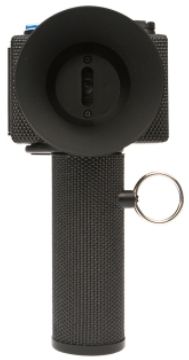
  • The Sprocket Rocket is a wide angle, semi-panoramic camera that includes the sprockets in the picture by default.

The Film:

Nothing special here.  Any 35mm film will work.

The Scanning Mask:

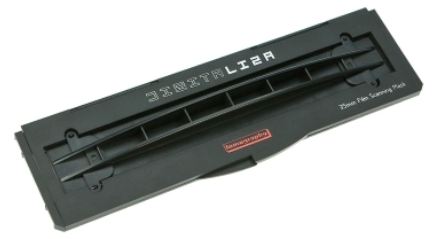
I use the Lomography DigiLIZA 135 Film Scanning Mask for the “sprockety” effect.  It’s got the right dimensions and is pretty easy to use, especially sincet the Canon scanning mask that came with the CanoScan wasn’t designed wide enough to include the far edges of the film.
The Scanner:

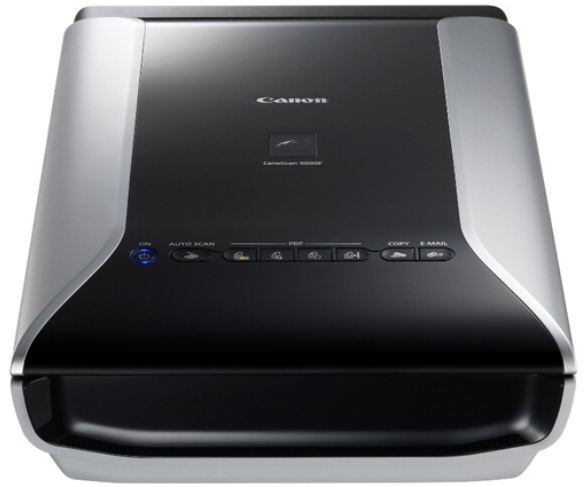
I use a CanoScan 9000F for all my pictures.  I really didn’t try any other scanners because the CanoScan was highly recommended by the some of the camera shops I’ve visited.  For the most part, I’m happy with it.  Since I don’t pay for photo printing anymore and I scan all my developed film myself, I’ve definitely saved more than the $180 I paid for the scanner.
The Software:

I tried using the software that came with the CanoScan, but dumped it because there was only so much I could control.  So, after some browsing around, I saw a lot of good stuff about VueScan.  I downloaded an evaluation copy and ran it on my computer and it worked great.  It uses a tabbed interface that let’s me do a bunch of stuff that I wasn’t able to with the Canon software.  VueScan is definitely worth the $70 I eventually paid for it.
The Problem:

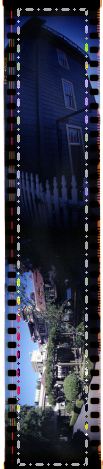
Early on, I started scanning pictures that didn’t have the sprocket in them.  Scanning these pictures was quick and easy, but trouble started to brew as I tried to scan some of my first pictures off of the Diana F+.   I would initially get a blue hue and no matter how many times I tried to fix this, the hue wouldn’t go away and the bright colors in the frame were not shining through.

Now, if I set the scanning mask handles and excluded all the dark parts of the picture, I could get all my colors, but I would also lose my sprocket holes.  That’s bad…
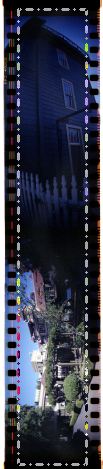
After some searching around the internet, I found some help.  However, not many people were using VueScan, so I contacted their support.  With the pieces I found online and the instructions from the VueScan tech, I was able to piece together a process that lets me scan my pictures with the sprockets holes and without the blue hue!

The Solution:

Here are the basic steps I use to scan my “sprockety” pictures.  I’m sure the procedure can be streamlined at some point, but it still works as is…and that’s what counts.

1.   After placing your masked film on your scanner and selecting the right settings, click the “Preview” button to get the initial scan.  You’ll initially get the blue hued scan…and that’s ok.

2.  Use the scanning mask handles and select the area of the picture between the sprockets and you’ll see the colors looking as you were expecting them to.
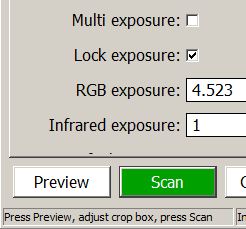
3.  Put a check in the “Lock Exposure” check box and click the “Preview” button again.
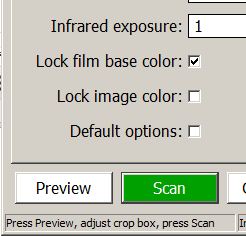
4.  Put a check in the “Lock Film Base Color” and expand the mask handles to include the sprocket holes.
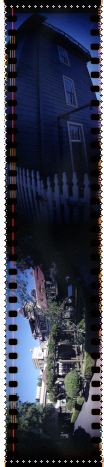
5.  Press the “Scan” buttton to finally scan your colorful picture.

6.  Finally, the scanned picture will end up in the default folder set in your VueScan settings.

The Conclusion:

So that’s how I scan my “sprockety” pictures.  If I hear or find better ways of doing this, I’ll be sure to update this post.  For now, this is just the best way to go…

Filed under: Analog Life, Film, Tip, Toy Camera, , , , , , , , , , , ,

Lomography Sample Sale

Following a great week up in Redmond and picking up the prints from my first photo exhibit, I went to the Lomography Store-LA  for the tail-end of its weekend sample sale.

Picked up a few goodies for myself and some t-shirts for my wife.

Camera-wise, I got the gold colored Pop9 and a second SuperSampler Dalek edition toy cam for starters and more film for future projects.

I’m still figuring out how I’m going to use the Pop9.  Maybe I’ll add some gels to the lenses or something.

For the SuperSampler, I’m definitely going to try a permanent modification.  I’m modifying the mask inside the camera and plan to convert it from four chambers to two.  This can be done by snipping away the correct two chamber walls in the mask.  That way, you’ll get two lenses exposing into each of the two remaining chambers.  I saw some of Satomi’s pics in a demo once and was really impressed with the results she got by modifying her SuperSampler.

So, along with the two new toy cams, I got several rolls of Fuji Astia 100F (120), Kentmere 100, Fuji Superia CZ 800 and Fuji Velvia 100 (all 35mm).  Since I picked up some vintage cams on eBay over the weekend, I’ll be using this film on the new (old) equiptment as they come in.  Each roll ranged between $2.50 to $3 each, so it was a pretty decent deal in the end…


The Lomography Store in WeHo shot with a Lomo LC-A+

Filed under: Analog Life, Toy Camera, , , , , , , , , ,

Sticky Spools in my Holga 120N

I used to think that Fuji 120 film didn’t like my Holga 120N.  I was wrong…sorry Fuji.

Every once in a while, the turning of the film advance dial would get sticky and it would be really difficult to move to the next frame.  The further along I would go, the harder it would be to get to frame number 12.  I would eventually get to the last frame, but only after wrestling around a bit with the camera and working up a little sweat.  After all that work, the results after finishing that last shot were either the spooled film not being tightly wound around as it usually should or not being able to finish the roll as the dial was stuck beyond my mortal strength.  Either result usually ended up with my removing of the film from the camera and manually re-winding the film in the dark.

After some asking around and a little experimentation, I think I figured out what happened.

The issue with the loosely wound film was caused because of the missing foam pieces that are usually glued into the film spool compartents in the Holga 120N.  Without the spongy pressure that presses against the winding film, you get pockets of slack as the film is winding around the spool.  The uneven wind of the film would then put pressure against the chamber walls, making it hard to turn the take-up spool.  This can cause pretty bad light leaks (or good ones, if you’re lucky) once you expose the finished roll to light.

Here's a shot of where the missing foam should be. Gotta replace it for future, hassle-free, photo sessions.

The best way to fix this is to replace the foam with similarly sized pieces that are about 3/4″ to 1/2″ inch thick.

The second problem came up from my attempt to temporarily fix the missing foam issue.  I stuck a folded piece of cardboard under the new film spool to add resistence.  Problem was that the cardboard was a little too thick and as the film spool turned and turned, the piece of cardboard would wedge itself deeper under the spool.  In the end, the spool would get stuck and off to the dark room I went.

Here's the newly replaced folded paper sitting under an emptied spool. The piece before it was too thick and the new piece is half the original thickness.

The simple fix to this was to just use a thinner piece of cardboard…or even better, replace the foam with similarly sized pieces that are about 3/4″ to 1/2″ inch thick.

Here’s a shot I took that came from one of my loosely wound spools exposed to light…

The Metro station under Pershing Square in Los Angeles

It’s not too bad of a shot.  The light leak adds a little character to the picture.  What do you think?

Filed under: Analog Life, Tip, Toy Camera, , , , , ,

Lubitel 166B

How it happened

When the Lomography Store – LA announced that they were going to have a Lubitel 166+ workshop, I made it a point to attend.  I was curious as to how those big square cameras worked.

Turned out, they weren’t that bad.  They were pretty Lomographied (my own word) to the point that it was fun to use…however I wasn’t ready to drop the $350 on it.

So I turned to my friend eBay and found a vendor who was selling a ton a cameras at a pretty good price.  The only catch is that he’s in the Ukraine.  So even though the cameras were pretty well priced, the shipping was at least $20 each.  After some emailing, back and forth, he was nice enough to give me around $5 off for each camera I bought.  I checked his other listings and aside from the Lubitel 166B, I got a Kiev 4, Zorki 4 and a Smena Symbol for around $200 dollars.  Not a bad deal since the Lubitel 166B was only around $60.

Lomo Lubitel 166B

A few notes about the Lubitel 166B…

  • Manufactured by Lomo in Russia in the 1980’s
  • Lubitel is Russian for “Student”
  • They’re made of bakelite plastic material (body) and metal parts (inside)
  • The design is based on the Voigtlander Brilliant
  • It’s a TLR (Twin Lens Reflex) camera (upper glass lens if for focusing, lower glass lens has the shutter)
  • It uses 12o medium format film

A couple of differences between the Lomography Lubitel 166+ and the Lomo Lubitel 166B…

  • The Lubitel 166+ has less knobs on the outside
  • The Lubitel 166+ can shoot with 35 and 120 film
  • The Lubitel 166B has a cold shoe with a PC cable plug in the front
  • The Lubitel 166+ uses symbols to help with the F-Stops.

For the Lubitel 166B, missing some of those nice features on the newer Lubitels isn’t too bad.  I still saved about $150…and I love my Lubitel 166B.  The pictures I take with it are pretty awesome.  They’re sharper than a Holga and I feel that I have much more control over the shot.

Here are a couple of shots I took with my Lubitel 166B in Atlanta, Georgia:

The Gymnast just outside of the Georgia Dome in Atlanta

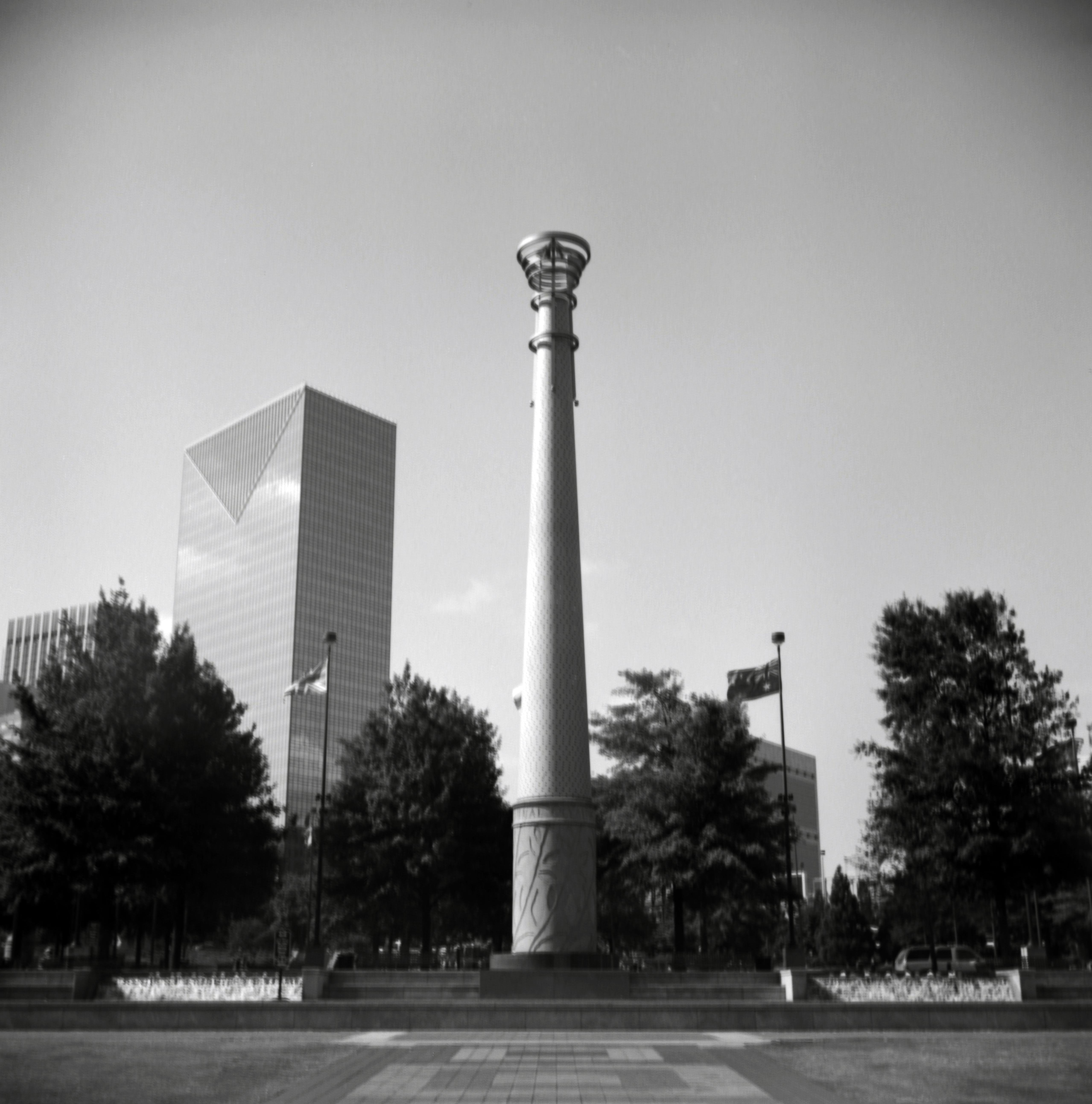
Olympic Park in Atlanta, Georgia

Pros…

I love the quality of the image.  I rarely have to touch up a well exposed frame.

The focus, aperture controls are intimidating at first, but you get used to them and you learn a lot from this type of camera.  Who needs symbols!?!  Use the Sunny 16 rule instead…

Remember, the price was still around $170 cheaper…

Cons…

The Lubitel 166B is a delicate camera.  The smaller knobs that hold the spools in place fall off and the threading inside them is easily stripped.  I’m trying to find replacement knobs for them, but in the meanwhile I use #4-40 nuts and stripped down paper clips to keep the spools in place so I can continue using the camera.

The camera case I got with it is pretty basic and a pain to put on and take off.  Use a larger camera case instead that lets you secure the camera.  Your Lubitel will love you for it.

Also, be careful with the door on the Lubitel 166B.  I added some velcro to mine to keep the door from accidentally opening.  Looks wierd, but it comes in handy.

There is no warranty for something like this.  You may have a harder time finding someone to fix it than the more modern Lomography Lubitel 166+.

Last thoughts…

I don’t regret getting the Lubitel 166B over the more expensive, yet more versatile Lubitel 166+.  I saved money on a camera that I think takes rather amazing pictures, especially since I save my Lubitel (and my other medium format cameras) for the big, artsy shots like statues, monuments and murals.  The cons list above may run a little longer than the pros, but with some knowledgeable shooting and some TLC, you’ll be glad to have gotten the Lubitel 166B.

On a side note, I’m also tempted to check out the Lubitel Universal next…  🙂

Filed under: Reviews, Russian Camera, , , , , , ,

In the Beginning…

Call it Toy Camera Photography, Lomography or Analog Photography – whatever it is, it’s still fun.  If it creates an image on film and I can scan it, I’ll do it!!!

Folks ask me, “why shoot on film?  Digital is easy.”  My response is always the same:

“You either like to eat or you like to cook.  I like to cook”

The same goes with photography. I want be a significant part of the process required to get my pictures to where I’ll be happy with them…and hopefully you will too.

In the past year, I’ve learned quite a bit about analog photography.  I’ve bought several cameras, attended workshops and consider myself a pretty active photographer.  I pretty much keep a camera next to me all the time, just ready to take that quick shot if I see it coming.

The purpose of this blog is share my experiences as I load, shoot, develop and print the dozens of pictures I take every week.  Hopefully, the feedback I get will teach me something as well.  I’ll focus on toy cameras (Desderi, Lomography), Russian cameras (Kiev, Smena), modern film cameras (Fuji, Lomo) and older cameras from yesterday (Canon, Konica); if I have to spool it, I’ll use it.  I’ll also experiment with film, lights and other important pieces needed to make this as informative a blog as possible.

That’s it for now, but be on the look-out for upcoming posts…

Fun at Alcatraz with a Lomography ActionSampler Flash and B/W film

Filed under: Analog Life, Russian Camera, Toy Camera, Vintage Camera, , , , , , , ,